Film Graph – Self Directed

This was a self-directed project completed as part of my MA. The project was a sub-project of my final piece. The project examined the types of films I have seen, and from which countries they were made. As my main project was about the ‘self’, this project fitted in nicely with the theme, encouraging the viewer to come to their own conclusions about the author of the graph.

PDF: Film Graph

Films Movies Graph Download

Featured Portfolio Work

[display-posts category=”featured” posts_per_page=”-1″ order=”DES” orderby=”date”]

To My Portfolio

Five Kinds Of Silence – Stage Design

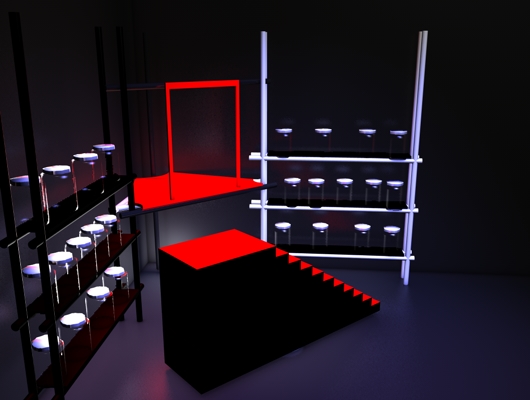
The show took place at New Venture Theatre in Brighton. I was responsible for designing and building the central staircase. It had to be able to rotate freely in 360 degrees, lock into position, and have a door enabling the cast to enter the inside.

It had a central pivot to enable it to rotate on the spot. Sadly, no photos of it seem to exist, but here are 3D renders of the model I created.

Skills Range

  • Stage Design
  • Stage Construction


Featured Portfolio Work

[display-posts category=”featured” posts_per_page=”-1″ order=”DES” orderby=”date”]

To My Portfolio

How to choose your hosting provider – Tips and criteria to look for

Before having a website built for you, one of the main decisions you’ll make will be choosing a hosting provider, and to be honest, it can be a bleedin’ minefield.

If you take just one thing away from this article, experience has shown me that when it comes to hosting providers, it’s an instance where you get what you pay for, and very cheap hosting can end up costing you more. Not just financially either.

So What Are My Options?

When it comes to hosting, there are many things to consider, and I’m not going to attempt to cover every facet, though I will certainly give you plenty of information, and certainly enough to allow you to make an informed decision. Let’s start by having a broader look at the possible options.

Email Only

I thought I’d include what may seem a surprising entry. Such options will not let you host a website, but will give you an email associated with your domain name. So if for whatever reason you decide you don’t need a site, you can still have a custom email address. Less relevant now however, as there’s really no excuse not to have a web presence. Find out why a web presence is so important.

MOST SUITABLE FOR…

  • Email!
  • Free Hosting

    Yes, such a thing does exist, and it does sound great, but there certain things to consider as free hosting will have many constraints to it. Such constraints may not being able to have a unique domain name. i.e. having to use a subdomain such as yourwebsiteaddress.wordpress.com. This isn’t the only issue though; such setups are highly limited in what they offer, may serve their own adverts on your site, and not let you export your site should the free hosting no longer fulfil your needs.

    Also, it doesn’t look professional, though it can be useful to have one setup as a business blog to help drive traffic to your website.

    MOST SUITABLE FOR…

    • Personal blogs
    • Hobby related websites

    Shared Hosting

    Shared hosting is usually an extremely cost-effective way of getting a website hosted. The cost of this type of hosting does vary greatly, depending on the features and reliability that you need.

    Shared hosting means that the server on which your site is placed contains many other websites, all stored alongside each other. This means that a site which uses a large amount of bandwidth can have a negative effect on the performance of your site. This is most usually a problem where in order to try and make more money, the hosting provider starts to cram far too many sites on the same server, with an increasing number of sites fighting over very limited resources. However, there are some very good shared-hosting options around, and this is probably where you’ll start, and as the technology becomes cheaper, shared-hosting is often able to contend with a reasonable amount of demand without impairing performance.

    MOST SUITABLE FOR…

    • Personal blogs
    • Freelancer websites
    • Small business websites
    • Local online magazines
    • Local organisations

    Dedicated Hosting

    For most people, this would be complete overkill. Dedicated hosting means that you get a web server that is dedicated to your site only. No fighting for resources here, your website will have complete reign over the resources of your server.

    Great for when you need performance and can’t accept anything less than the absolute best, but dedicated hosting is expensive. Also, it means that a greater understanding of technology, or the resources to hire someone who does.

    MOST SUITABLE FOR…

    • Larger business sites
    • Sites which deliver lots of data
    • Sites which receive lots of traffic

    But that’s not all. Broadly speaking, dedicated hosting comes in several flavours.

    DEDICATED HOSTING- Whereby you hire a dedicated server which belongs to your hosting provider. This is the most common.

    CO-LOCATED – This type of hosting is one where you buy your own server and pay a hosting company to house it at their premises, where the location will be more suited to the job. This gives you the ultimate in flexibility, but you’re going to pay a premium for any management or trouble-shooting.

    SELF-HOSTED – Similar to Co-Located, but housed at your premises. Again it’s highly flexible, and of course you have immediate physical access, but you’re going to need to have highly skilled staff in-house, or at least to hand. Getting your own server up and running isn’t actually as difficult as you’d expect. But when you start to consider security and debugging, it can turn nightmarish.

    Things To Consider And Decisions To Make

    WINDOWS OR LINUX SERVER?
    Linux – is the short answer. Though in some instances Windows may be more suitable, particularly if you’re having a site built with a proprietary Microsoft piece of software such as ASP (MS’s version of PHP, the server-side scripting language which is used in the development of dynamic websites.) If you’re unsure of which is best, your developer or chosen hosting provider can help you. In most instances, picking Linux will be the best option.

    SIZE OF PIPELINE

    This is how the hosting computer is connected to the internet. The greater the pipeline, the faster data can be uploaded / downloaded, therefore the faster your site can deliver its content. Pipelines are typically T1 or T3 at the moment. T3 being the faster of the two.

    CLIENTS PER MACHINE

    This ties in nicely with my comment about the pitfalls of very cheap hosting where some companies spread their resources too thinly. Try to find out if the provider has their own guidelines in place regarding limiting the number of clients per machine.

    EMAIL ACCOUNTS

    Cheaper providers may not include the use of an email associated with your domain, while other companies will let you create as many as you need. Check that email addresses are included in the price.

    DISK SPACE

    How much space you have available on the server dictates how much data you can store on there, and so suggests what the upper size limit of your site will be. Some providers offer very small packages while some will offer unlimited space. Consider the type of material you’ll be making available on your site, and that you’ll have room to grow.

    DEPENDENCE / TIE-INS

    If your provider isn’t working out for you, can you leave (and migrate your site) easily? Many offer a trial period, but it’s not unknown to get ‘Money-back anytime’ guarantees. Of course, by committing to longer periods, you can usually get discounts.

    DATABASES

    These are required for dynamic sites as the database is where all your content etc. is stored. Enquire as to how many databases are included in your plan, and that at least one is included in your plan. Some companies will consider these as premium add-ons.

    RELIABILITY / SPEED OF ACCESS

    This is very important. The servers need to be reliable (that is not crashing frequently) and need to be capable of delivering a good speed. Of course this also depends on the type of content your serving, but if a simple site is taking more than a couple of seconds to load then there may be issues.

    BANDWIDTH

    The bandwidth refers to the amount of data that is made by the requests to your server. Both data to and from the server. The higher your traffic (the more visitors to your site) the more this is going to be. For simple sites, a couple of Gigabytes should be enough, but check the limits and also what the penalties are for exceeding it.

    MULTIPLE DOMAINS AND SUBDOMAINS

    Domains are unique address that lead to websites, while subdomains are just what they sound like, sub domains of the main one. (E.g. blog.domain.co.uk) Typically, subdomains are free to add, whereas new domains will need to be paid for. However, if you’re looking to host multiple sites, check that your account will allow multiple domains to be hosted as part of the same package.

    CONTROL PANEL / CPANEL

    This is the area which gives you control over the management of your hosting and related services. Some providers use their own control panel, but many use cPanel, an excellent web hosting control panel. Ask your provider about what they use.

    SUPPORT

    This is a major issue for many people, and I’ve run into providers with very good support, and some with absolutely dire support. Unfortunately, there seems to be more bad support out there than good. Can you reach your provider by phone? How long do they take to respond to emails? If your site has gone down, you don’t want to be spending days trying to get hold of someone.

    Do Your Research

    Once you’ve got a short-list of some providers who offer all that you need, start to search for some reviews online. Just head over to Google and search (Hosting Company) reviews. This will help you weed out any providers which seem to have good deals, but suffer from extremely poor service. Don’t go on price alone.

Why should I have a website? (or why it’s inexcusable to not have web presence)

You could consider me a little biased on this topic, but really there’s no reason not to have a website for your company / charity / cause / yourself. It’s relatively easy and cheap (possibly free) to get started, and the benefits greatly outweigh these minor concerns. With much grander online endeavors, you will be looking to put more time and money on the line, but here I’m focussing on what you need to get going.

Why Should I Have A Website?

Before I give a list of very good reasons as to why you should get a website together I’d like to start with a little story.

Some time ago I had a carpenter in to replace the frame of the backdoor. After awhile he came to ask if I had a Yellow Pages as he needed to get something. I told him that I didn’t, but I asked him what he was looking for, which happened to be a locksmiths. I was already working on my computer at the time, so it was just a second or two later that I had a list and map of all the local locksmiths on screen. “Blimey! That was fast.” he said “That’s brilliant. There’s one just around the corner. Thanks.” And off he went.

The moral is that traditional methods (telephone directories and enquiry services like 118) of finding local businesses are rapidly becoming obsolete, as people have increasing access to the internet wherever they are due to soaring sales of tablets and smart phones.

The devices we own are changing the way we access information and find what we’re looking for. Having a web presence is a must.

1. The internet is now the main way we find information

Whatever we’re looking for, whether it’s furniture, an accountant, or a plumber, online is usually where people search first. Also, as google offers up lists of local businesses when people search, you’re missing out if you don’t have a website.

2. It’s expected that a business will have a site

Even if someone is already aware of your company, they’ll try and find your contact details online. It does seem strange when you come across a company which doesn’t have a site, and your customers are likely to go elsewhere.

3. It’s cheap advertising

Look at it as cheap advertising. It’s not expensive to get a basic web presence up and running, and it can be done quite easily. See the resources on the right of the page.

4. It lets you educate your customers

It’s a highly effective way to let your customers know about your services / products, and what the benefits are of doing business with you, rather than your competitors.

5. It will let you gather potential leads and other information

You can provide newsletter sign-ups and gather analytics information about your website vistors, enabling you to tailor your services.

Also, if you have a site, potential customers can contact you via a form on your site, meaning that you’ll catch contact information and enquiries that you have otherwise missed.

6. Let’s you reduce your time spent performing task that could be automated

If you find that you’re handling the same sort of customer queries, or wasting time doing other tasks, have a think about what tasks could be performed by your website instead. You could add FAQs or let potential customers download product spec sheets etc.

An example of this on my site is the client area where I store files for my clients. I found that clients frequently misplace files I’ve sent them, so I decided to make them available online for them. This doesn’t just save my time, it means my clients can get their files without having to wait for me read their email and reply. If I’m out of the office, it could be some time.

7. Cheaper to update that print materials

If you do provide catalogues or other expensive print items, they’re quicker, easier and cheaper to update and get to your customers if they’re provided digitally.

Are you convinced yet?

I hope so. There’s really no reason not to get a website up. It can be done very cheaply, and very quickly for something relatively basic, but the benefits can be great. Check out the the information below.

It’s Go Time – A Rough Guide To Getting Up And Running

– Find a reputable hosting provider. Bear in mind that the cheapest usually isn’t the best option. You can get something that will suffice for a small site for under £60 per annum.
– Once you’ve found several potential providers perform a search using google to check for reviews by searching for [hosting provider name] reviews.
– Ideally choose a provider which will include email accounts, databases, and offer simple, automatic installations of WordPress.
– Sign up and choose a relevant domain name. It may time a few attempts as you’re preferred name may have already been taken by someone else.
– Install WordPress, and get creating your site, by choosing a nice theme and adding your content. (WordPress is pretty easy to get to grips with)
– Create a Google account and get listed on Google Places.

Sounds like too much effort?

I’ll admit that it’s rather simplified, but the basics are there. There is an even simpler option available to you by not using your own provider, but using the hosting option that WordPress offer. You can sign-up for free, but some functionality will need to be paid for, and it would certainly be worth to purchase your own unique domain. Check out wordpress.com.

Picking A Content Management System – The Pros & Cons Of Joomla, WordPress and Drupal

The best things in life are free, and this also applies to Content Management Systems (CMS). A CMS is something which allows you to create your own website and manage the pages and content easily. No longer do websites need to be built from scratch (although they may need to be, depending on what you want the end result to be) but you can start with a basic skeleton that you customise to your liking. There’s a number available, and they they all have their good points and bad.

The Open-Source Movement

One of the greatest developments in regards to computer software is the open-source movement. That is software created and released by the open-source community. Open-source means that anyone can take the code and freely distribute and develop it. Here’s the mission of the open-source initiative:

The Open Source Initiative (OSI) is a non-profit corporation with global scope formed to educate about and advocate for the benefits of open source and to build bridges among different constituencies in the open source community.

Open source is a development method for software that harnesses the power of distributed peer review and transparency of process. The promise of open source is better quality, higher reliability, more flexibility, lower cost, and an end to predatory vendor lock-in.

– opensource.org

The benefits are quite obvious, especially to anyone who has ever used some proprietary software that has all sorts of hideous limitations and catches that only appear when it’s too late to do much about it.

I’ve had this myself, and although I won’t say which piece of software it was, I’ll tell you about my experience. This well-known accounting software seemed reasonably priced and so I purchased it. All seemed to be going well until I needed to run-off my reports for the end of year, when I found out that some basic functions that you’d expect to be included, in fact, weren’t. I was expected to pay a triple figure sum just to unlock a feature which would then let me run off the report. It didn’t end there. It soon transpired that to do many, very basic tasks, I would have to fork out hundreds of pounds. Fortunately I wasn’t so deep in that I couldn’t climb out. Instead of giving this company more money I sought an alternative. Take heed of this cautionary tale.

The Pros and Cons of using WordPress as your CMS

WordPress is probably the best known CMS platform out there, though you probably associate it with blogging, it can do a great deal more. WordPress is open-source and available to download and install under your own domain. It’s so popular that some hosting providers have implemented ways for you to quickly and easily install this, meaning you can actually get it installed in seconds whilst also handling setting up the required databases for you. Of course you still need to add all your content, customise it and so on, but still…

There seems to be a little anti-wordpress snobbery in the design community, where they don’t see it as being worthy of their consideration, but this isn’t justified. True, WordPress is only really suitable for the simpler stuff, and although it can be used for ecommerce and other more complex sites, I wouldn’t personally recommend it as there are more suitable options.

The negative feeling I’ve mentioned is born of a time when you’d expect sites were custom built from the ground up or web developers used their own proprietary CMS for their clients. A time when web publishing tools were still in their infancy and most people had never heard the term ‘blog’.

I’ve heard someone refer to it as the ‘Fisher Price‘ of CMS, which is a little unfair. Yes it’s simple, but that’s why it’s easy to use, and it’s more advanced than most give it credit for. Although WordPress does seem to attract smaller companies there’s a few large companies which do, though generally not as their main site but rather a satellite one, such as company blogs or product-specific sites.

For which sort of sites is WordPress best suited?

• Starter Websites, such as for a small business which doesn’t need to sell items online e.g Plumbers, Carpenters

• Magazine-style sites where the emphasis is on frequent news updates and releases

The Pros of WordPress

  • Even if your hosting provider doesn’t support quick installations of WordPress, you can still get it installed manually quite quickly
  • Very user-friendly. Even the most ardent technophobe should be able to get going with WordPress in a reasonable amount of time
  • Great for simple websites, such as small business sites
  • Lots of available plugins which increase the functionality of your site
  • WordPress is great for SEO. It’s highly optimised for search engines, and many plugins can aid this further
  • Most templates are easily customisable without technical knowledge

The Cons of WordPress

  • You could easily out-grow WordPress should your site expand greatly. Should you need a power-house for a large, corporate site, WordPress probably doesn’t have the functionality you’re looking for.
  • Although plugins are great, they sometimes break your site, or if the developer stops updating them, they may not work with newer versions of WordPress. You’ll either have to find alternatives, fix them yourself, or get someone to fix them for you.
  • It’s not very secure. This is my biggest gripe with WordPress. I could forgive everything else if they fixed this. You cannot easily hide your login page, meaning that hackers / bots can find it and attack through the brute-force method (just trying different passwords until they get it right. Bots can try thousands of combinations in a very short time.) There are plugins which you can use to, for example, lock-down the login page for a specified time after too many incorrect attempts. There are also other security concerns which appear periodically.
  • WordPress sites can often be identified as such by looking at them, though some good design can disguise the fact
  • There are updates which need installing, all the time. This is a little irritating. Although it’s good to see problems fixed and features added, frequent updates mean than themes / plugins are more liable to break, needing to have an update themselves. Not a week will go by when something doesn’t need upgrading. Yes the process is quick and simple, but can have undesired results.

The Pros and Cons of using Joomla as your CMS

Joomla (normally spelt Joomala! But I won’t because exclamations marks are tiresome to read) is one of the other major players in the open-source CMS field. Something it’s achieved through being reliable, functional and yet keeping a reasonably shallow learning curve when compared to other CMS systems.

While it’s certainly more flexible, powerful and capable than WordPress, it shows when you see the admin or ‘back-end’ of the site. At first sight it appears to be dauntingly complex. I’m afraid that is the price of having the additional flexibility and functionality. A justified price all the same.

Joomla has a huge following and there’s many great websites out there that are built using it. Many you might not expect as it’s not just smaller companies who favour it, there’s a substantial number of large corporations which use it, including MTV, many governments, Barnes & Noble, the MOD, Orange, eBay, Sony Pictures, Ikea and some Universities. That’s just a quick look at the cross-section of different organisations. WordPress on the other hand tends to attract small companies, independents and some celebrities.

For which sort of sites is Joomla best suited?

  • Highly dynamic websites which will need to manage registrations and accounts of your customers
  • More complex offerings, such as ecommerce, forums and larger sites with lots of activity / content
  • The Pros of Joomla

    • Like with WordPress, many hosting providers offer a simple installation procedure for Joomla
    • It’s highly functional
    • If you decide to go this route, you won’t have to worry about it not being able to cope with the growing demands of an ever-increasing site
    • Although a little difficult to learn, it’s certainly easier to use than some
    • Lots of plugins are available
    • Multi-lingual sites are easy to implement

    The Cons of Joomla

    • Learning it fully will take time
    • Aesthetic customisations are not easy to do. Needs knowledge of CSS, though you can always use a theme or hire someone to create a custom one
    • Some argue that Joomla isn’t great in regards to SEO, but has improved in recent versions
    • Uses a proprietary add-on called ‘MooTools’ to include extensions whereas using jQuery would be much better to have implemented

    The Pros and Cons of using Drupal as your CMS

    Drupal has seen much of it’s potential audience get enticed by either Joomla or WordPress. It’s still very widely used and is a web developers dream. It’s immensely powerful, and can be bent entirely to your will (or at least the will of a skilled developer). It’s power and highly flexible configuration come at a price – one of usability.

    Of the type of users which opt for an open-source CMS, Drupal tends to take the cream of the crop. The BBC website, the White House, and NASA have all used Drupal.

    Coming back to its usability for a moment, it is easy to see why it can be a nightmare. The high customisation naturally leads to a highly complex CMS. Whereas with WordPress you can install it and you’re off, Drupal needs a bit more prep. This prep is also relient on someone who is very technically minded. The trouble doesn’t end once the site is up – the administration side is clunky and has a habit of using cryptic terminology causing even the mild-mannered to swear quietly under their breath

    Why is this? It’s because just like the front-end of the site, the back-end can be highly customised to the needs of the user. So the developer can make the back-end more user friendly if they like.

    At this point I need to stress that Drupal has come very far in making it easier for slightly less technically able people to use it. It’s undergone some radical changes, and the last version I used (it was a while ago now) was easier to get my head around than earlier ones. It seem that they’ve got the message about usability and are actively listening to feedback and making it all just a little bit simpler.

    For which sort of sites is Drupal best suited?

    • Huge, unwieldily corporate sites (e.g BBC) with masses on content, administrators and websites users.

    • Large ecommerce solutions

    The Pros of Drupal

    • All the power and flexibility you will ever need, and a load more thrown in for good measure
    • • One installation can be used to manage multiple sites – very handy if you have multiple sites
    • • Pretty much everything can be configured
    • • Quality modules that are, on the whole, well maintained.

    The Cons of Drupal

    • • Can be difficult to get set up if your host doesn’t offer an automated solution to take the pain out of the process
    • • Even the latest version (7 at the time of writing) isn’t as easy to use as other CMS solutions

    Time for a vague conclusion

    No one CMS is specifically better than another when taken on face value. You’ll have to decide what your needs are, and the needs of your customers / website users first. Not forgetting that you’ll have to keep in mind where you wish to be in the future. Knowing these details will help make your decision easier.

    An important point

    If you’re looking to create a site with a specific and common role, such as a forum or an ecommerce website, it will be useful to have a look at what purpose-specific CMS alternatives there are.

    There will be lots available for pretty much everything that will have the required elements contained within it, saving you the time of making a generic one-size-fits-all CMS do exactly what you require.

Ecommerce – How To Increase Checkout Conversions

We’ve all done it. We’ve been shopping online, or maybe just browsing. We’ve added things to the basket and started the checkout process, only to abandon it. There’s a number of reasons for this, some that you can do something about and some that are more difficult to resolve.

So Why Do People Abandon Their Shopping Baskets?

There’s been many studies on the subject, and although there are also many answers, a number of them are extremely common. You won’t be able to convert all those abandoned carts, but you should be able to make some impact. Let’s start by looking the reasons people jump ship part way through the buying process:

HIGH SHIPPING COSTS – Getting through the checkout to find that shipping costs are high will make customers think twice. Particularly if the cost are unjustifiably high. Customers can feel that some sellers profit from postage costs and this really irks them.

CUSTOMER WAS BROWSING OR COMPARING PRICES – Many people will idle away time by simply doing a little window-shopping. There’s not a great deal you can do about those. In regards to the second lot, are your prices competitive?

CHANGED MIND / BUYER REMORSE – Sometimes people just second-guess themselves, feeling a little guilty about spending money that they could be spending on something they need, rather than want.

SAVING PRODUCTS FOR LATER CONSIDERATION – Maybe they want to check out the high street prices, remembering that somewhere may have a sale on. Or just maybe they want to sleep on it. Can tie-in with buyer remorse.

TOTAL COST IS TOO HIGH – Airlines have recently been busted by the Office of Fair Trading for this, adding additional fees, suc as taxes and card-handling fees at the very end of the checkout process, meaning that something which looked like a good deal initially, actually wasn’t at all. A sure-fire way of raising your customer’s blood pressure by wasting their valuable time.

CHECKOUT PROCESS IS TOO LONG – The longer people spend in your checkout, the more time they have to change their mind.

CHECKOUT ASKS FOR TOO MUCH INFORMATION – This also couples with the ‘long checkout’ reason above. Only ask for the minimal information required in order to process the payment. Additional information can be gathered later.

SITE REQUIRES REGISTRATION IN ORDER TO BUY – This is unnecessary, at least to begin with. By all means give users a ‘tick box’ option to create a account, but don’t demand it. Registration is another obstacle for your customers.

SITE IS UNSTABLE / UNRELIABLE – 404 errors, timeouts, security warnings will all put doubt in the mind of your customers. Make sure your site works correctly and loads quickly.

FEEL UNABLE TO TRUST THE SELLER – Do you and and your site come across as trust-worthy? Customers need to be able to verify that their details are safe and that they’ll receive the product.

3D SECURE – In the UK, the most common 3D secure system is ‘Verified by Visa’. If you haven’t had the misfortune of dealing with it, you’re lucky. It’s an ill though-out system that supposedly adds extra security, but does nothing of the sort. It confuses / infuriates customers and is the slayer of ecommerce sales. No joke, it obliterates on-line sales and has even put a stake through the heart of some sites.

OK, So How Do I Increase Sales?

Fortunately you can do lots to stop people from abandoning shopping carts/ baskets, and although you won’t be able to win the battle every time, you should hopefully see an improvement. Let’s have a look at what you can try, starting with tackling the main reasons.

HIGH SHIPPING COSTS
– Be clear about your shipping and postage costs
– Don’t let it be a nasty surprise at the end of checkout
– If possible, let them know the costs upfront
– Or offer free postage and packaging

CUSTOMER WAS BROWSING OR COMPARING PRICES
– Make sure that people can find the total cost quickly
– Save the basket items so when they return, the items are there
– Keep your prices competitive
– Promote your particular USP (Unique Selling Point)

CHANGED MIND / BUYER REMORSE
– Keep the buying process very short, don’t give them time to change their minds
– No nasty surprises (e.g. adding costs)

SAVING PRODUCTS FOR LATER CONSIDERATION
– Make sure that you’re prices are competitive
– Consider offering ‘Free Shipping Weekend’ offers or similar
– Remind people that they have items in their basket

TOTAL COST IS TOO HIGH
– Some repetition here: be upfront about costs

CHECKOUT PROCESS IS TOO LONG
– Streamline the process as much as possible, keep people moving along quickly
– Let people know how long the process is (e.g. a percentage gauge)
– Inform people of exactly where they are in the process, and let them easily move back and forth without losing details

CHECKOUT ASKS FOR TOO MUCH INFORMATION
– Keep it to the bare minimum
– Give people different payment options so that don’t have to give card details

SITE REQUIRES REGISTRATION IN ORDER TO BUY
– Make this optional
– Give this option after the sale is complete

SITE IS UNSTABLE / UNRELIABLE
– Optimise images so they they jave a small file size, but keep quality
– Check for broken links, create a custom 404 page which gives alternative options
– Test your site in all common browsers. Do it load correctly?
– Check for error messages. The Internet Explorer ‘Unsecure Items’ is quite a common one
– Is your sever up to the job? Check for down-time and time-outs
– Update your CMS (whatever platform you’re using) and ensure that your website code is compliant

FEEL UNABLE TO TRUST THE SELLER
– People buy from people, not faceless websites. Let them know who you are
– Make sure that you give your physical address
– Include your telephone number – a landline number
– Let people use buying methods that they’re comfortable with, such as PayPal so they know they have security
– Use HTTPS (not just HTTP) when collecting sensitive data. Get an SSL Certificate from a vendor such as VeriSign Secure

3D SECURE (Verified By Visa / MasterCard SecureCode)
– Just don’t use this – not until shoppers are comfortable with it or it’s mandatory

3D Secure systems are not the secure and user-friendly tools that they claim to be. Feel the wrath of the consumer public (your customers) here. It’s not just me that hates it.

General Tips To Increase Sales

Underline your links – All text links should be underlined or have a clear difference which makes them stand out from other text, and only your links. It helps users navigate your site.

Improve the overall aesthetic quality of your site – Don’t underestimate the value of good design and what it can bring to your site. A slick looking site can increase the perceived worth of the products your selling, and makes you look more legitimate. This also applies to your overall brand.

Improve the overall aesthetic quality of your site – Don’t underestimate the value of good design and what it can bring to your site. A slick looking site can increase the perceived worth of the products your selling, and makes you look more legitimate. This also applies to your overall brand.

Include a highly visible phone number – Must be a landline. This really makes you seem trustworthy. The majority of shoppers won’t ever ring it, preferring to use email, but just knowing they can puts them at ease.

Check for typo’s and grammatical errors – Although they do creep in here and there, they can make a site look very unprofessional.

Don’t bury your pricing information – Be open and frank about it. Your customers will thanks you for it and due to the immediate gratification culture, this can give you an edge on your competitors. Even though who may have slightly lower prices, but customers are just unable to find the information.

Add an ‘about us’ page – Don’t dismiss the benefit of the personal touch. It shows that you stand by what you offer and are open and upfront.

Give clear calls-to-action – ‘Buy now’, ‘add to cart’ and so on. Guide people through the buying process.

Answer telephones calls and respond to emails promptly – Delays in getting back to people can really give them cold feet, and more importantly, gives them time to shop around elsewhere. It seems obvious, but so many people put these things off.

Let them know of the payment options – Display images and seals of the payment methods you offer, such as PayPal and the cards you accept. Also show security seals of the tools that you use to make shopping on your site safe.

Let users choose to save information – This could be the delivery address for example. This speeds up the process next time they shop with you.

Let customers easily change quantities and continue shopping – Customer expect to be able to do this, and customers often decide to add extra instances of the same item (most notably consumables) if the price is right, or if it means they qualify for free shipping.

Get reviews / testimonials – Although some customers are wary of these, due to the there being instances of faked and paid for reviews, they can still be an effective way of alleviating fears.

Give a clear final review – Just before the user clicks the button to complete the purchase give them an overview, showing all the details so that they can quickly confirm. Let them know what they can expect from you in the way of confirmation emails etc.

Recommend related products – This can be a great way to do some up-selling just before the start of the checkout process.

Include your contact details – This is very important. Not only does it make you appear more trust-worthy, but if they have any questions or problems during the checkout they can quickly get in touch.

Provide multiple buying and shipping methods – People have their own preferences and requirements, so do your best to pander to them.

You saved this much / You qualify for free shipping – If people have made a saving or qualified for some other benefit, such as free shipping or a free gift. It helps stave off buyer remorse.

Was this price, now this price – Showing current/previous prices can help people know that they’re getting a deal. This has a reduced effect now as so many ecommerce sites seem to permanently display these price comparisons, thereby eroding any credibility. Best used infrequently and for short periods, such as a weekend.

Time your newsletters / product launches / sales carefully – Experiment with different times of day, days of the week. If your audience is quite localised, even check what the weather is doing. If it’s a bit grim outside, you may get more people stuck indoors browsing your site.

Give estimated shipping / delivery dates – Not an exact science as any number of things can get in the way, but let people know what to expect and send them an email when it’s sent out to them.

Offer rewards to get people to take action – This could be a referral programme, entry to a draw for giving reviews or testimonials.

Offer free samples – Free samples can be offered to either encourage people to spend a little more, or just to promote other products they may be interested in.

Offer great after-sales support – Good customer service gives people a greater sense of security and breeds trust. Maybe offer a longer returns period, although this may not be suitable for every business. However, the longer the return period, the less likely people are to return items. Strange but true.

A/B Split Testing – This should be done continually by presenting different customers with slightly different content and layouts. try changing the colour of buttons, the positions of your calls to action and so on. They might seem like very minor adjustments, but they can inexplicably have major effects.

Identify product features / benefits with bullets – Website visitors, on the whole, have short attention spans. The bullet point is your friend as it quickly distils information and encourages people to read the entire list.

Collect opt-in email leads – This allows you send special offers to your customers. Don’t spam them though, and only send them something they genuinely will be interested in.

EU Cookie Directive – Information, Compliance and Resistance

So What Is This EU Cookie Directive?

It’s a new law, issued by the EU in 2009 that bans the use of cookies on websites without explicit consent being given by the user. The law actually cam into being on the 26th May 2011, but because no-one was ready, it was decided that it wouldn’t be enforced until 26th May 2012.

Although the mischief which the law is attempting to stop is well-intentioned, the directive hasn’t been terribly well thought out.

What Is A Cookie?

A cookie is a small text file that a website stores on your computer. While many of these are harmless, and even required for some site features to function, some websites use them in ways which are considered far too intrusive.

Cookies are often used to remember that you’re signed into a website, at what point you’re at in a checkout process, any preferences you want to save and so on. Very useful things.

On the other hand, some companies use them in unreasonably intrusive ways – for example recording which sites you visit and delivering highly-targeted adverts which follow you around the web

Seems Reasonable Enough. What’s The Problem?

Getting explicit consent from users is going to be a huge headache for those who use cookies on their websites for perfectly legitimate reasons. It means that website users are going to be presented some sort of confirmation box, asking them if they are willing to accept these cookies, even perfectly innocent ones. The challenge of collecting this consent is posing a huge usability challenge to those who create and manage sites.

Also, the directive puts the onus on the website owners, not the advertisers. A good example is the Facebook ‘Like’ button. Seemingly innocent, but even without clicking it, Facebook knows what site you’re visiting, and harvests this data, which it then gives to advertisers so that they can bombard you with adverts. To me, this suggests that the EU has got it wrong, and needs to rethink some things.

So What Action Do I Need To Take?

That depends on the cookies which you use. Those which are deemed to be “essential” such as login cookies can be used without consent. The term “essential” applies to the users needs, and not your own. Also, this currently only applies to companies operating in the UK. Where your site is hosted is irrelevant.

If you’re using cookies that are included, you’ll have to start getting users consent. There’s a number of ways of doing this. All have a negative effect on your site. I’m in the process of putting systems in place for my clients currently, and doing my bit to get this law repealed. Please sign the petition.

You will also need to update your Privacy Policy to explain what cookies are, why you’re using them and what information they hold.

Fight The Good Fight


This Change.org petition is no longer available.

In A NutShell, Why Should This EU Cookie Directive Cease To Exist In It’s Current Form?

IT WILL POSE AN ANNOYANCE TO WEB USERS – They will be presented with an alert each time they visit a site which is covered by this directive, to the extent t that they may seek out non-EU alternatives.

ADDED COSTS TO EU BUSINESSES – Businesses have to go through the hassle of implemented systems to comply with this law. Non-compliance could cost you a hefty £500,000 for a serious breach.

IT MAINLY TARGETS THE WRONG PEOPLE – Even if the cookie is from a third-party, like the crafty Facebook ‘Like’ buttons, you’re responsible if it’s on your site. Companies such as Facebook and the ad-serving companies are the ones who should be affected by these regulations.

THE LAW DIFFERS FROM COUNTRY TO COUNTRY – Being compliant in one doesn’t mean that you’ll be compliant according to the local laws of the user.

IT AFFECTS MORE THAN JUST COOKIES – Any technology that needs to store something on your machine will need your explicit permission.

EU BUSINESSES WILL SUFFER – No matter what business you’re in, your market will be competitive. People like me, use cookies to gather non-identifiable information to improve the websites we create, making the sites easier to use, and more relevant to the visitor. If people decline to accept, we’re deprived of this data, giving non-EU businesses a huge advantage.

USER EDUCATION IS THE KEY – Web browsers already have systems in place to allow web-users to control what information they share and what information is stored on their machine. Greater emphasise should be placed on educating web users and safety / privacy.

Bug – Photography

I fulfilled a number of roles for this show that was produced as part of the Brighton Festival Fringe. I helped construct the set, I produced the programme and took photos during a run for press and publicity purposes.

Skills Range

  • Set Construction
  • Graphic Design
  • Photography


Featured Portfolio Work

[display-posts category=”featured” posts_per_page=”-1″ order=”DES” orderby=”date”]

To My Portfolio