Design, Web and Print Glossary, Terms, Definitions – R

R

Radio Button – Thos round selectable buttons that will only allow one to be selected at a time.

Raster – A raster image is one that is made up of pixels. As opposed to vector.

Reductionism – The act of reducing elements of an advert down to the essentials so that the ad still works.

Render / Rendering – Renders are the outputs, such as a video or image from a 3D modelling package, or a video from a video production package. This can be a lengthy process depending on the project and the machine that is doing the rendering.

RGB – The colour mode that colour electronic displays use.

A  |  B  |  C  |  D  |  E  |  F  |  G  |  H  |  I  |  J  |  K  |  L  |  M
N  |  O  |  P  |  Q  |  R  |  S  |  T  |  U  |  V  |  W  |  X  |  Y  |  Z

Design, Web and Print Glossary, Terms, Definitions – Q

Q

Quark – A page layout / desktop publishing package. Lesser used now in favour of InDesign.

QuickTime – A media player and media codec used to display content on the web.

A  |  B  |  C  |  D  |  E  |  F  |  G  |  H  |  I  |  J  |  K  |  L  |  M
N  |  O  |  P  |  Q  |  R  |  S  |  T  |  U  |  V  |  W  |  X  |  Y  |  Z

Design, Web and Print Glossary, Terms, Definitions – P

P

PDF – Portable Document Format. A common and versatile file format for sharing documents and sending print-ready artwork to printers.

PHP (Hypertext Pre-Processor) – A scripting language which resides on the servers where a website is held. PHP carries out all its work on the server and then generates HTML which it then presents to the web browser.

Pixel – The basic parts that make up a raster image, such as a photograph. The image is made up of a number of pixels.

Pixilation – This occurs when the DPI (dots-per-inch) is too low. Often seen when an image pulled from the web has been printed out.

Plug-In – Additional add-ons that can be applied to a piece of software, such as extensions for web browsers or WordPress.

PNG – An ideal image format for preparing images for the web. It’s lossless and it also supports alpha transparency.

Printer Spread – The order in which a printing company differs from how they are finally presented when printed and bound. A Printer Spread is the name for this layout which is usually all the pages printed on one large sheet which is then cropped.

Problem – This word is used to describe the issues facing your customers or reason behind a project. By defining it as a problem you start to look for solutions.

Proposition – That is the promise that your product / service makes.

Prototype – An advanced mock-up of a project, usually more tangible. For instance, for a web project, several working web pages might be created.

Push It – A phrase used in the design / marketing industry to encourage a project to be reworked.

A  |  B  |  C  |  D  |  E  |  F  |  G  |  H  |  I  |  J  |  K  |  L  |  M
N  |  O  |  P  |  Q  |  R  |  S  |  T  |  U  |  V  |  W  |  X  |  Y  |  Z

Design, Web and Print Glossary, Terms, Definitions – O

O

Opt-In – A marketing term where the recipient of the communication has specifically given authorisation to receive it.

Opt-Out – The opposite, where recipient is deemed to have agreed to accept marketing communications unless they explicitly say otherwise. E.g. ‘If you would prefer not to receive such communications then please tick the box.’

Outline – Either the outline of a shape, or a method of converting text within a document to outlines prior to printing to avoid issues which may arise due to missing fonts.

Overnight-Test – The process of leaving a project that you’ve been working on too long so that you can no longer “see the woods for the trees”. Coming back to the project after a break lets you see it how it really is.

A  |  B  |  C  |  D  |  E  |  F  |  G  |  H  |  I  |  J  |  K  |  L  |  M
N  |  O  |  P  |  Q  |  R  |  S  |  T  |  U  |  V  |  W  |  X  |  Y  |  Z

Design, Web and Print Glossary, Terms, Definitions – N

N

Negative Space – Although the term seems to be used interchangeably with ‘white space’, there is a difference between the two. Negative space, simply described, is the absence or removal of an element, or part of an element, thereby changing its meaning.

Neon Glow – An effect applied to text which replicates a neon sign.

Nod-Factor – The physical response to a presenter that clearly communicates a positive reaction.

Noise – Noise refers to the grain and ‘fuzz’ that can appear in photographs, video and scanned images. Noise usually occurs when shooting in low-light conditions, or when using poor quality equipment.

A  |  B  |  C  |  D  |  E  |  F  |  G  |  H  |  I  |  J  |  K  |  L  |  M
N  |  O  |  P  |  Q  |  R  |  S  |  T  |  U  |  V  |  W  |  X  |  Y  |  Z

Design, Web and Print Glossary, Terms, Definitions – M

M

Mandatories – A list of what should be included/excluded from a project.

Meta-Tag – HTML tags that contain data about the web page, such as keywords, author etc.

Mock-Up – Usually a rough approximation of what the final product might look like. Even if it’s for an interactive project such as a website, a mock-up is often a flat, static image which gives the look and feel of the finished site.

Mnemonic – Something which is used to help consumers recall your product. These can be either visual or audible, and often a combination of the two.

Mood Board – A mood board is a rough collection of images, texture and colour swatches etc. which are compiled to give an impression or feeling of a project. They are useful as they can be made quickly and help convey ideas to clients.

Mouse-Over – An effect where a link or graphic on a webpage will change when the user positions the mouse over it.

A  |  B  |  C  |  D  |  E  |  F  |  G  |  H  |  I  |  J  |  K  |  L  |  M
N  |  O  |  P  |  Q  |  R  |  S  |  T  |  U  |  V  |  W  |  X  |  Y  |  Z

Design, Web and Print Glossary, Terms, Definitions – F

F

Fast Colour – Inks which are designed to retain their vibrancy as the product is repeatedly used and washed.

File Type – The type of digital file, identified by its suffix. e.g. .pdf, .eps, .doc.

Finish – (1) The surface of a certain paper, defined by the characteristics of the surface. (2) A broad term applied to cover the multitude of port-print operations that can be undertaken, for instance trimming and binding.

Flash – A technology that provides enhanced interactivity predominately on websites, but can be included as part of other mediums, such as video games. However its use is diminishing as newer technologies appear.

Font – The term given to a complete collection of letters, symbols, characters of a given typeface.

Form – Applies to areas on websites where the user will input data. Login forms and contact forms for example.

Frame (animation) – A frame is a single image, one of many that makes up an animation or video.

Frame (web) – A defined area on a webpage that is used to break the page up into separate sections.

FTP (File Transfer Protocol) – The method by which a server is accessed to allow files to be uploaded/downloaded.

A  |  B  |  C  |  D  |  E  |  F  |  G  |  H  |  I  |  J  |  K  |  L  |  M
N  |  O  |  P  |  Q  |  R  |  S  |  T  |  U  |  V  |  W  |  X  |  Y  |  Z

Design, Web and Print Glossary, Terms, Definitions – E

E

Emboss – To press an image into paper using a tool so that a relief of it is left behind, raised from the surface. The opposite of deboss.

EPS (Encapsulated PostScript) – A common vector-based file, often supplied to printers. If you have a logo created it will also usually be supplied in this format.

Exaggeration – In advertising, exaggerating the benefit which is based on a truth.

Execution – Carrying out and completing a project.

Export – A term given to the method of exporting a file from a piece of software. Exporting is usually done to provide a file for a particular purpose, such as files for use on the web, PDFs etc.

A  |  B  |  C  |  D  |  E  |  F  |  G  |  H  |  I  |  J  |  K  |  L  |  M
N  |  O  |  P  |  Q  |  R  |  S  |  T  |  U  |  V  |  W  |  X  |  Y  |  Z

Design, Web and Print Glossary, Terms, Definitions – D

D

Deboss – To press an image into paper so that it id indented. The opposite of emboss where the impression is made towards you.

Deckle Edge – A roughly finished edge on a piece of paper.

Development – Generally refers to websites; the actual building of the site, writing code and implementing the different technologies.

DHTML – Dynamic Hypertext Mark-up Language, an extension of HTML. It allows webpages to react dynamically to users input.

Die – A dies is a tool used for cutting, scoring, stamping, embossing and debossing in to or on to paper.

Die Cut – The method of cutting irregular shapes into a material using a die.

Direct Visual – Any visual that directly relates to the headline.

Dithered / Dithering – This is a method of displaying full-colour images on a display which has a reduced colour palette (e.g. 256). Patterns of approximate colours are created to give the illusion of being full-colour. Lesser-used now, but can still be seen in some web graphics where it has been used to keep the file size small.

Don’t Tell, Show – Adage for using images to demonstrate a point instead of words.

Dot Gain – When using a halftone printing method the dots can print larger on the paper when they are on the printing plate.

Dot Size – The size of the dots used in halftone printing.

Double Meaning – Using headlines or taglines with double meanings can be powerful when used correctly. e.g. “Labour isn’t working.”.

DPI – Dots-per-inch, the number of dots that make up a printed image, generally this is 300dpi for print, though higher DPIs are also used. DPI is also (though technically incorrectly) used to refer to video displays too (see PPI). Screen displays have a lower DPI than print, hence images pulled from the web generally look blocky and of poor quality when printed as they are usually produced at 72dpi. Note however that most displays use 96dpi.

Drop-Down – A menu type found on web pages. When the users clicks or moves the mouse over the menu, a drop-down appears, presenting the user with the options.

Drop-Shadow – A technique of giving a page element, such as text or an image, a fake shadow behind it to give the illusion of depth.

A  |  B  |  C  |  D  |  E  |  F  |  G  |  H  |  I  |  J  |  K  |  L  |  M
N  |  O  |  P  |  Q  |  R  |  S  |  T  |  U  |  V  |  W  |  X  |  Y  |  Z

Clients Are From Mars, Designers Are From Venus

I thought that it would be an interesting exercise to post a question on LinkedIn, asking about client / supplier relations. I pride myself on having good relationships with my clients but I’m aware that just sometimes, clients and suppliers can fail to understand each other. I went ahead with my question and received some interesting answers. Suppliers were more forthcoming with answers, read into that what you will.

So for an insight into the minds of your clients or suppliers, continue to read the comments in the columns below. They’re quite revealing!

These are direct quotes from the responses I received, and do not necessarily reflect my own opinions!

Suppliers/Designers Answers

1. “There are three concepts for the client to consider, they are Fast, Cheap, and Good. You can pick two, and only two”

2. “Graphic design is a strategic communications tool and not just simply ‘art'”

3. “That if design is extremely cheap, it’s probably not actual design and won’t be effective”

4. “I’ve spent a lifetime learning and honing my skills, so I probably know best at least some of the time”

5. “Clients should, in fact, sweat the details”

6. “Delaying payment is a lot harder on me than you realise”

7. “Quality is extremely important to me, so please don’t cheap out on art/photos”

8. “Intellectual Property Rights are all that keep creatives in business and should therefore be respected”

9. “‘Crowdsourcing’ will not get them good results and only serves to hurt the industry”

10. “Most designers actually make less than the average salary”

11. “If a price seems too good to be true, it probably is”

12. “Please appreciate that offset vs. digital printing differs greatly in quality and turn around times”

13. “That social media is an ever-changing entity. What worked on Facebook last month may not be the best practice for this month”

14. “A sentence that begins with ‘can you just…’ makes many designers blood run cold. What appears to be a small change can often be several hours work”

15. “Appreciate my hourly worth (particularly true of highly experienced and educated designers)”

16. “Delays in providing content and in making decisions makes that important deadline harder to hit”

17. “The software and equipment I need costs me a lot – upwards of around £6000 and it seems something always needs replacing / upgrading in order for me to carry on working”

18. “We work very long hours. I’ve pulled all-night working sessions before now”

19. “Images pulled from your website are not suitable for printing! The resolution (dots-per-inch) is too low”

20. “The software isn’t ‘magic’. I do the hard work, the software does what I make it do”

21. “I love what I do and want to provide the best possible results”

22. “Delays in making decisions means that my projects all run together”

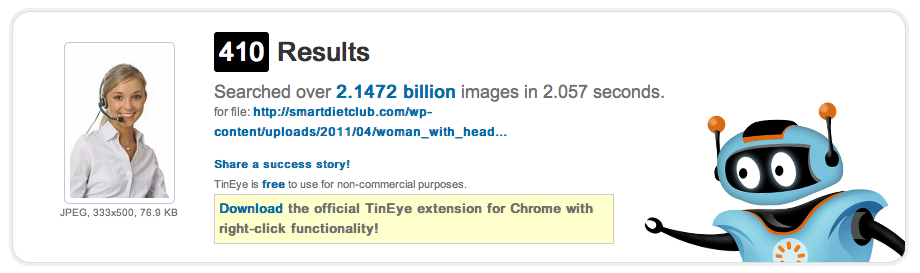
23. “Have your own photography done. It’s personable and more sincere than using stock photography – There’s one particular photo of a blonde woman wearing a headset that appears on so many sites” – I think he means this woman

Clients Answers

1. “Please don’t use jargon. It may all be second nature to you, but means nothing to me”

2. “Deadlines are there to be met. If you think it can’t be met, flag it up in advance”

3. “Using buzz-words doesn’t inspire me with confidence in your abilities”

4. “I know my business and I’m experienced in my field. I occasionally know what I’m talking about”

5. “Don’t tell me what you think I want to hear, tell me what I need to know. I’ll respect you more for it”

6. “Allow me to put forward some of my ideas. I may surprise you!”

7. “I’m mediating between you and others my team / my boss / a committee”

8. “If you can’t do something be honest with me”

9. “Out-sourcing is a bit of a minefield, so I will have lots of questions and be wary of being lumbered with a charlatan”

10. “There’s a huge variation in prices for certain types of work and it’s not always obvious why one person should be worth more than another”

11. “Stay in contact! It’s extremely worrying when freelances can’t be got hold of”